Everything you need to run a tighter operation
Every scheduling feature included. Add AI when you're ready.
For your customers
A booking experience so smooth your customers will wonder why every business doesn't work this way. No accounts, no friction, no confusion.
Online Booking Page
A polished, branded booking experience on your own domain. Your logo, your colors, your URL. Customers see a professional page that feels like yours — because it is.
Smart Slot Recommendations
The time when a provider is already in the customer's area shows up front and center. Alternatives are one click away, but most customers never need them. The best option is always the easiest choice.
Savings Badges
Efficient time slots display a "Save $X" badge calculated relative to each customer's own options. Customers pick the best time for your route because it's the best deal for them.
Guest Checkout
Name, email, phone, address. That's it. No forced signups, no account walls, no friction. Customers book in under two minutes without creating a password or remembering login credentials.
Returning Client Recognition
Returning customers are automatically detected by email address. Their name pre-fills, saved addresses appear, and previous notes carry forward. Repeat bookings take seconds.
Service Selection with Add-Ons
Customers pick their primary service and optionally add extras during booking. Duration and pricing adjust automatically so the schedule stays accurate and there are no surprises.
Variable Service Durations
Support anything from 15-minute touch-ups to full-day installs. Each service defines its own duration, and the schedule blocks the right amount of time automatically.
Google Places Autocomplete
Customers type their address and Google Places fills in the rest — accurate coordinates, formatted address, no typos. This powers the routing algorithm with precise location data from the start.
Service Area Validation
Instant feedback when a customer enters an address outside your service radius. No wasted time, no awkward follow-up calls. They know immediately and can look elsewhere.
Virtual Services
Offer consultations, demos, or coaching sessions without requiring a customer address. Virtual services skip the location step entirely — customers pick a time and get a Google Meet link automatically.
Email Verification
A 6-digit verification code sent to the customer's email with a 15-minute expiry. Prevents fake bookings, validates contact information, and ensures you can reach every customer who books.
Confirmation with Management Link
After booking, customers receive a confirmation email with a unique link to view, reschedule, or cancel their appointment. No login required — the link is their access token.
Token-Based Rescheduling & Cancellation
Customers manage their own appointments through a secure token link. Reschedule to a new time or cancel entirely — no phone call, no login, no friction for either side.
Client Portal
Returning customers get a self-service portal with saved addresses (including access notes like gate codes), full appointment history, and notification preferences. Everything in one place.
Price Locking
The price shown at booking is the price the customer pays — period. If you change your rates later, existing appointments keep their original price. No surprises, no disputes.
For your team
Your providers see their day at a glance — travel times, directions, client notes, status tracking. Less time planning, more time working.
Provider Day View
A chronological view of the day with travel times between stops, client details, service notes, and access instructions. Everything your team needs on one screen.
Route Map with Numbered Stops
An interactive map showing the day's route with numbered pins for each appointment and a home base marker. Providers see exactly where they're going and in what order.
One-Tap Navigation
Tap the address on any appointment and it opens directly in Google Maps or Apple Maps with turn-by-turn directions. No copying, no switching apps, no wasted time.
Real-Time Location Sharing & ETA
Providers share their live location so admins and customers know exactly when to expect them. ETAs update in real time based on current position and traffic.
Appointment Status Progression
Move each job through its lifecycle: Scheduled, En Route, Arrived, In Progress, Completed. Admins see status in real time. Customers get notified at key transitions.
Client Notes
Create, pin, and search notes on any client. Gate codes, dog warnings, equipment details, preferences — anything your team needs to know before they arrive.
Google Calendar Sync
Bidirectional sync with Google Calendar. ServiceReach appointments appear on your provider's calendar, and their existing events block availability so nothing double-books.
Personal Availability
Each provider sets their own working hours, breaks, and time-off requests. The booking page only shows times when someone is actually available to work.
For you
Analytics, team management, service configuration, and everything else you need to run the business — not just manage a calendar.
Analytics Dashboard
Revenue trends, appointment volume charts, and a provider scorecard — all in one place. See how your business is performing this week, this month, or this quarter at a glance.
Demand Heatmap
A geographic visualization of where your bookings are concentrated. Identify underserved areas, plan marketing spend, and see which neighborhoods drive the most revenue.
Revenue Forecast
Forward-looking revenue projections based on booked appointments, historical trends, and seasonal patterns. Plan hiring, inventory, and marketing with data instead of gut feel.
CSV Export
Export appointments, revenue, clients, and provider data to CSV for your accountant, your CRM, or your own spreadsheets. All your data is always yours to take.
Service Catalog
Create, edit, duplicate, and reorder your service offerings. Set pricing, duration, descriptions, and add-on options. Changes apply to future bookings instantly.
Multiple Pricing Models
Fixed price for standard jobs, quote-based for complex ones, or let the customer describe what they need. Mix and match pricing models across your service catalog.
Employee Management
Add providers, set per-provider working hours, assign service capabilities, and manage permissions. Each team member gets their own settings without affecting anyone else.
Per-Provider Service Areas
Set a unique service area and radius for each provider. A tech who lives on the east side covers the east side. Routes stay short, and you serve a wider total area.
Provider Invitations by Email
Invite new team members with a single email. They set up their own account, configure their availability, and start receiving appointments. No manual onboarding needed.
Time Blocks
Block time for holidays, company events, personal time off, or recurring commitments. Time blocks prevent bookings during those windows across the entire team or individual providers.
Workload Balancing
Automatically distribute appointments across providers so no one is overloaded while others sit idle. Adjustable strength lets you prioritize balance or route efficiency.
Appointment Management
View, filter, and manage all appointments in one list. Change status, reassign providers, add notes, or create appointments manually for walk-ins and phone bookings.
Client Management
Search, browse, and manage your entire client base. View appointment history, contact information, saved addresses, and notes for every customer who has ever booked.
Payments & Billing via Stripe
Collect payment from customers at booking time and manage your ServiceReach subscription through a secure Stripe-powered billing portal. No surprise charges, cancel anytime.
Admin Direct Booking
Create appointments on behalf of phone or walk-in customers. Full control over provider, time, service, and notes — marked as "Admin" source so you can track how customers find you.
Today's Operations Dashboard
Real-time snapshot of the day: who's working, who's done, appointments remaining, and revenue earned so far. See your entire operation at a glance without clicking into individual calendars.
Route Efficiency Analytics
Track distance traveled per provider, average travel time between stops, and route quality metrics over any period. See exactly how much driving your team saves week over week.
Multi-Locale Support
Set your country, currency, distance unit (miles or kilometers), and locale. ServiceReach formats numbers, prices, and distances to match your region — works internationally from day one.
Incomplete Appointment Tracking
When a job can't be completed, providers select a reason: no-show, access denied, safety concern, invalid address, or client cancelled on-site. Every outcome is tracked in your analytics.
From estimate to payment
Send estimates, get e-signature approvals, invoice after the job, and collect payment through Stripe — all without leaving ServiceReach.
Create & Send Invoices
Generate professional invoices from completed appointments. Add line items, taxes, and notes. Send to customers with one click.
Estimates with E-Signature
Send estimates that customers can review and approve with a digital signature. Approved estimates convert to jobs seamlessly.
Online Payments via Stripe
Customers pay invoices online through Stripe. Credit card processing with automatic receipt generation. No payment chasing.
Estimate-to-Invoice Pipeline
Convert an approved estimate into an invoice with one click. Line items, pricing, and customer details carry forward automatically.
Payment Status Tracking
See which invoices are paid, pending, or overdue at a glance. Filter and sort by status, date, or customer.
Activity Log
Every action on an estimate or invoice is logged — sent, viewed, approved, paid. Full audit trail for every document.
Your always-on front desk
An AI that answers calls, books appointments, and sends follow-up texts — 24 hours a day, 7 days a week. Available on Core + AI plans.
24/7 Call Answering
AI answers every call with your business name and custom greeting. Never miss a lead, even at 3 AM or while you're on a job site.
Automatic Appointment Booking
The AI books appointments directly into your schedule using your availability rules and slot scoring. Callers get confirmed on the spot.
SMS Follow-Up
After every call, the AI sends a follow-up text with booking confirmation or a link to book online. Keeps leads warm automatically.
Custom Voice & Personality
Configure the AI's voice, tone, and personality to match your brand. It sounds like a member of your team, not a robot.
Live Transfer
When a caller needs a human, the AI transfers to your team seamlessly. Complex questions and urgent issues always reach a real person.
Call Transcripts & Analytics
Every call is transcribed and logged. See what customers ask, track booking rates, and understand call patterns over time.
Try it yourself, right now
Call our AI receptionist and experience what your customers would hear. Ask about features, pricing, competitors — anything.
Under the hood
The scheduling engine that makes everything else work. Five scoring factors, cross-day intelligence, and fully tunable parameters — optimized across 103,000+ route simulations.
5-Factor Slot Scoring
Every time slot is scored 0-100 based on route fit, cluster match, gap efficiency, home proximity, and direction consistency. The highest-scoring slots surface first in the booking experience.
Cross-Day Intelligence
The algorithm doesn't just look at today. It scores slots across the full week so a flexible customer landing on Thursday — when a provider already has three nearby stops — is better than squeezing them into Tuesday.
Algorithm Presets
Choose from Minimize Driving, Balanced, Pack Schedule, or create a fully custom configuration. Presets are optimized across 103,000+ route simulations, but every weight is yours to adjust.
Demand Shaping Intensity
Control how aggressively the algorithm filters low-scoring slots. At full intensity, only the best options show. Dialed back, customers see more choices. You decide the tradeoff between route efficiency and booking flexibility.
Customizable Scoring Weights
Adjust the weight of each scoring factor independently. Prioritize cluster density over travel direction, or home proximity over gap filling. The algorithm adapts to your business, not the other way around.
Workload Balancing Strength
Set how strongly the algorithm distributes appointments across providers. High strength ensures even workloads. Low strength lets route efficiency dominate. Find the balance that fits your team.
Buffer Time & Scheduling Windows
Configure buffer time between appointments, minimum notice period before booking, and maximum advance booking days. Guard rails that keep your schedule realistic without manual oversight.
Emergency Surcharge Configuration
Set surcharges for same-day or next-day bookings. Customers see the extra cost upfront and can choose to pay it or pick a cheaper slot later in the week. You stay in control of urgent pricing.
Every screen, designed for speed
From the customer booking page to the admin analytics dashboard — here's what ServiceReach looks like in practice.
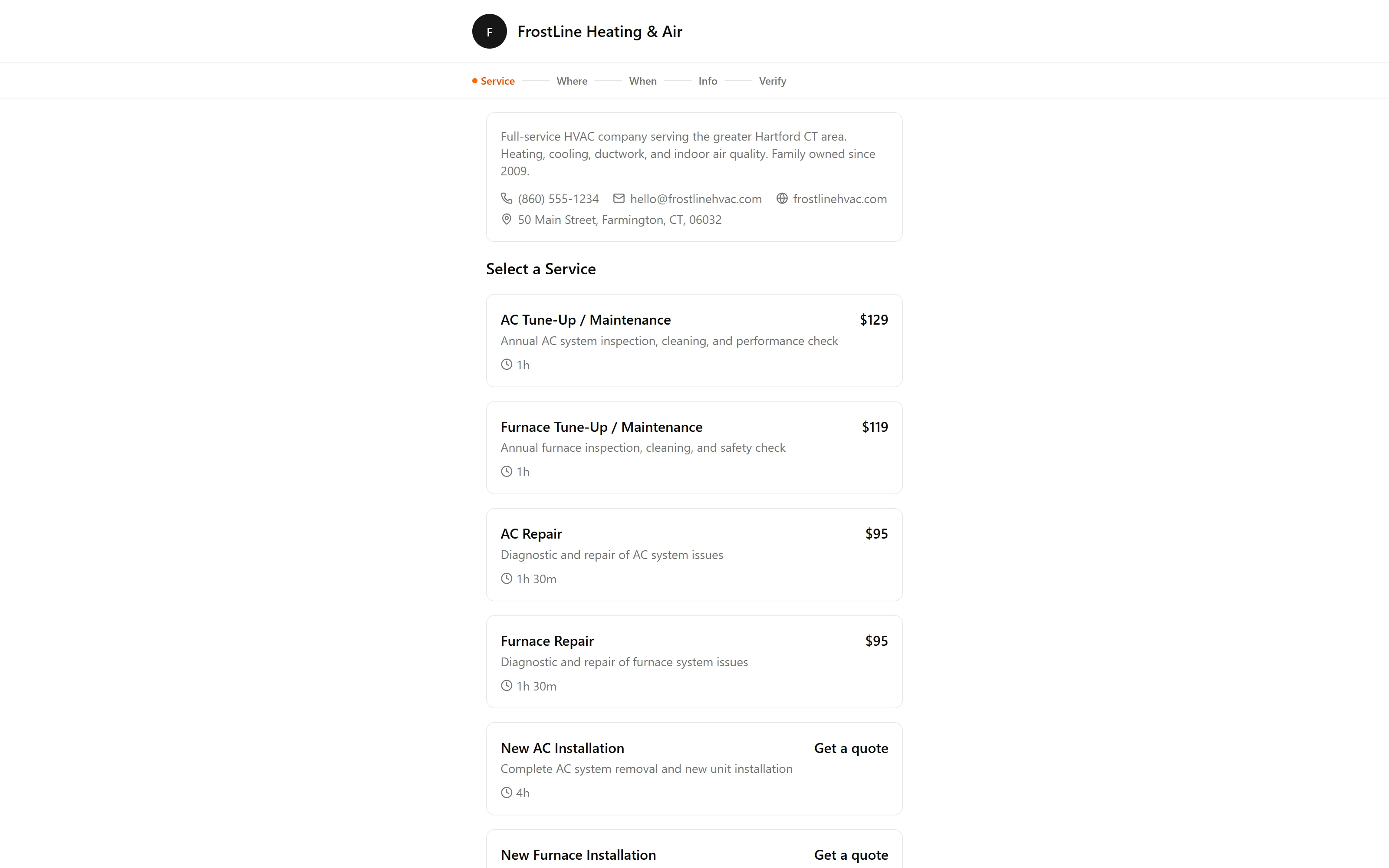
Customer Booking Page
Smart slot recommendations with savings badges. Customers see the best times first.
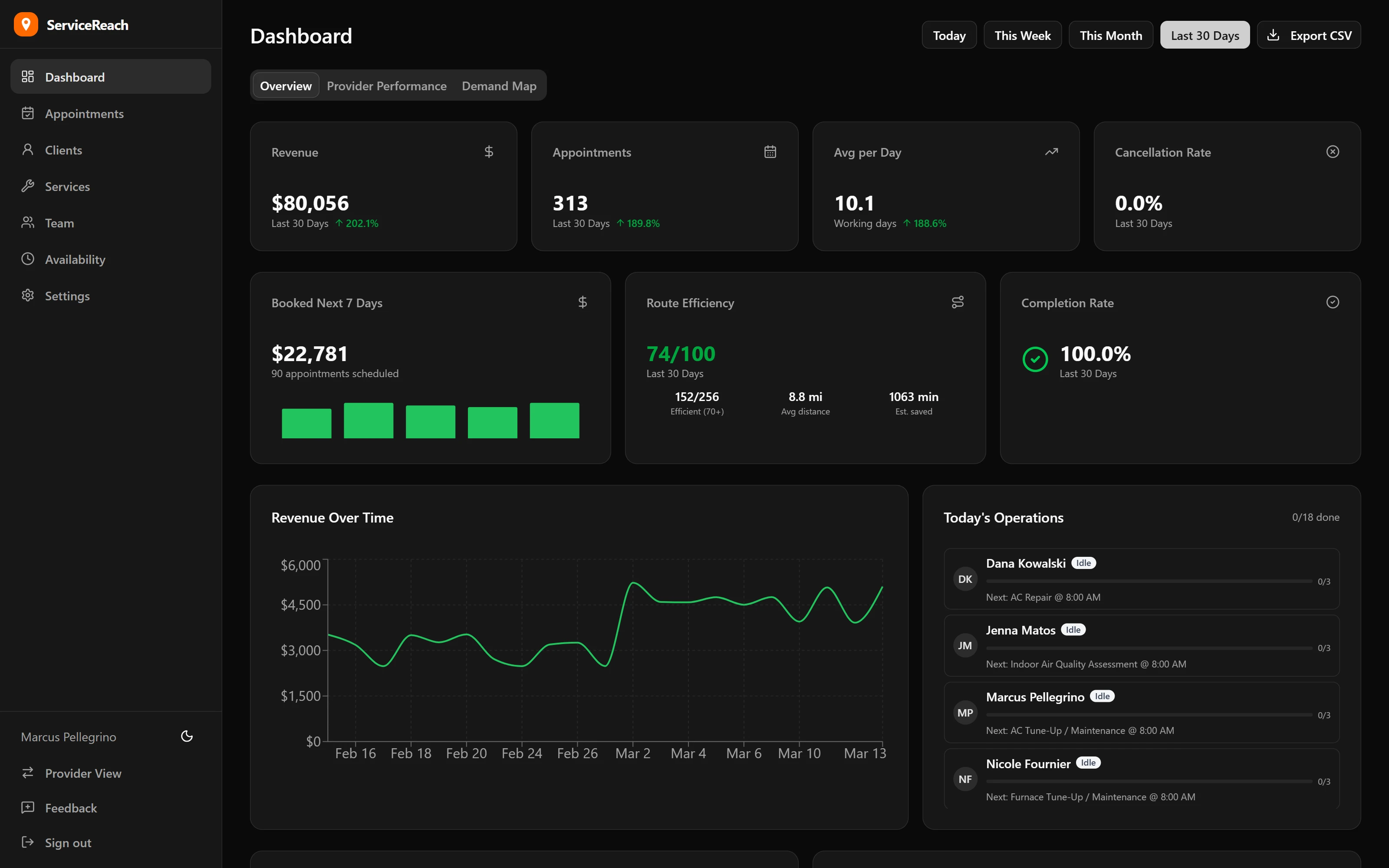
Analytics Dashboard
Revenue tracking, demand heatmaps, provider scorecards, and route efficiency metrics.
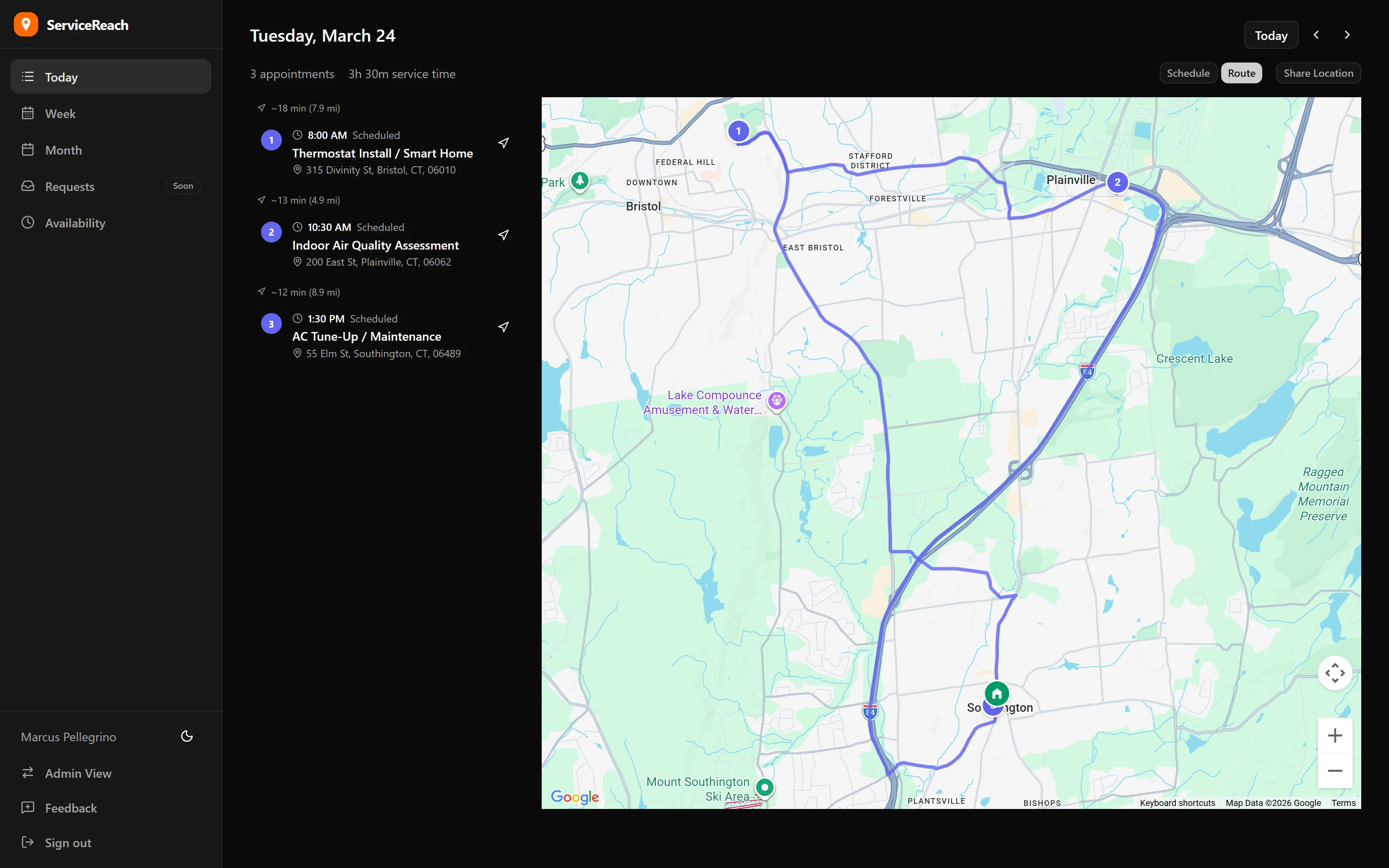
Provider Route Map
Interactive map with numbered stops, travel times, and one-tap navigation.
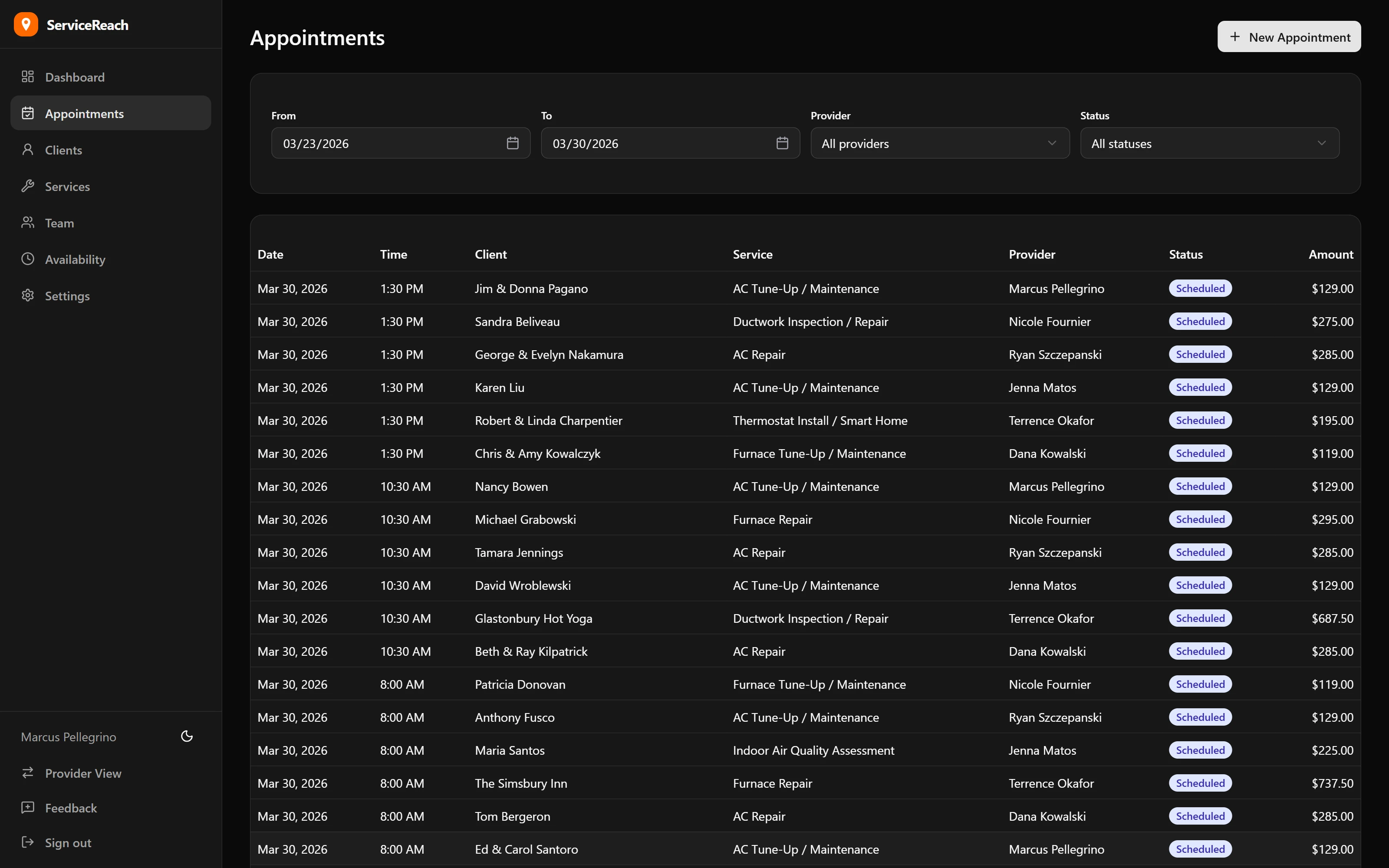
Appointment Management
Full appointment overview with filtering, status tracking, and provider reassignment.
Starting at $29/mo. 30 days free.
Core starts at $29/month with unlimited providers — scheduling, invoicing, estimates, and more. Add AI Receptionist from $79/month. Every scheduling feature included from day one.